Coming to the App Store

Your whole flower farm, in your pocket.

Log a cut in seconds at the bed, with no signal. See what's ready to cut today, what's selling and who owes you. BloomOS works on any phone now, and the native iPhone and Apple Watch apps are on their way.

Works in the browser on any phone today, and adds to your home screen like an app.

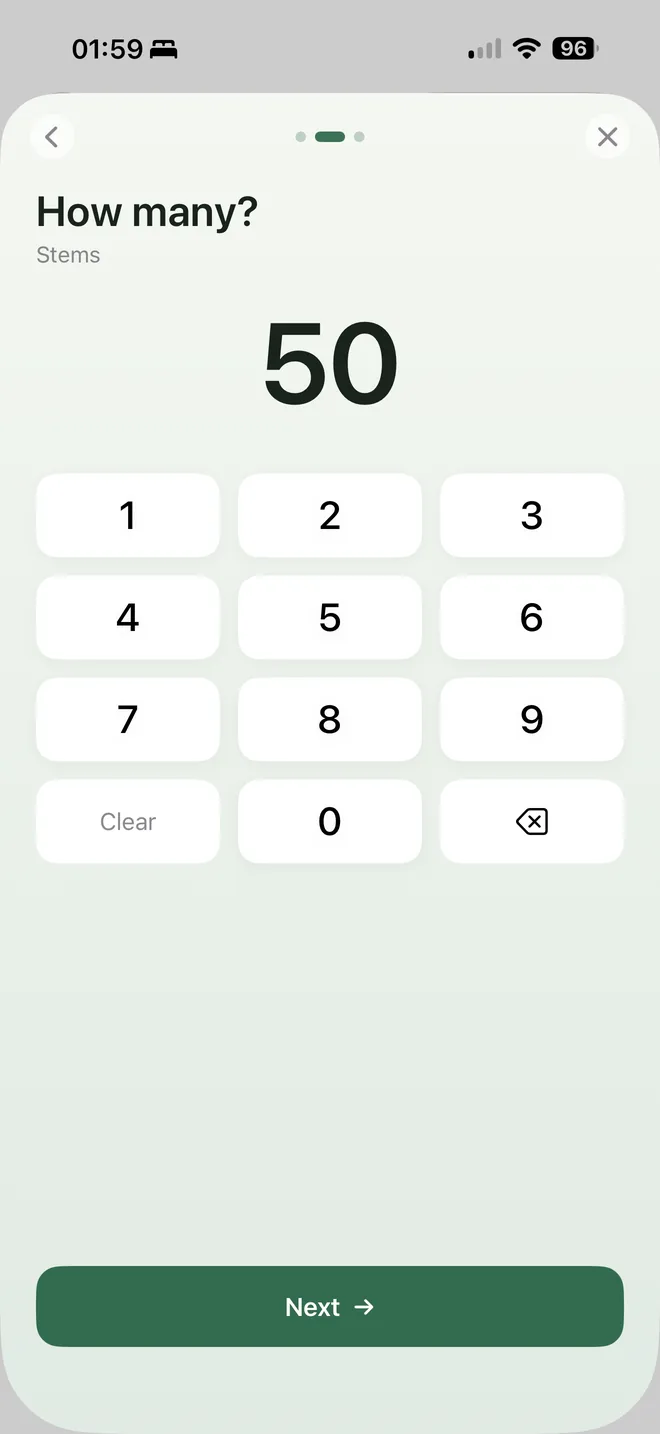
Logging a cut in BloomOS on iPhone: the 'How many?' stem keypad with big keys
to log a cut, gloves on
30 sto log a cut, gloves on
of signal needed in the field
0 barsof signal needed in the field
varieties with growing data
3,000+varieties with growing data
from an order to an invoice
1 tapfrom an order to an invoice

A tour

Everything a flower farm runs on, on one phone.

These are real BloomOS screens. Each one does a job you'd otherwise do on paper, in a spreadsheet or from memory.

Cut log

Log a cut in thirty seconds.

Pick the planting you're cutting from, tap the stems on a keypad big enough for wet gloves, and you're done. It saves on the phone the moment you tap and syncs when you're back in range.

  • One-handed, at the bed, at 5am
  • Works with no signal at all
  • Every stem tied to its bed and variety
Logging a cut in BloomOS on iPhone: the 'How many?' stem keypad with big keys

Today

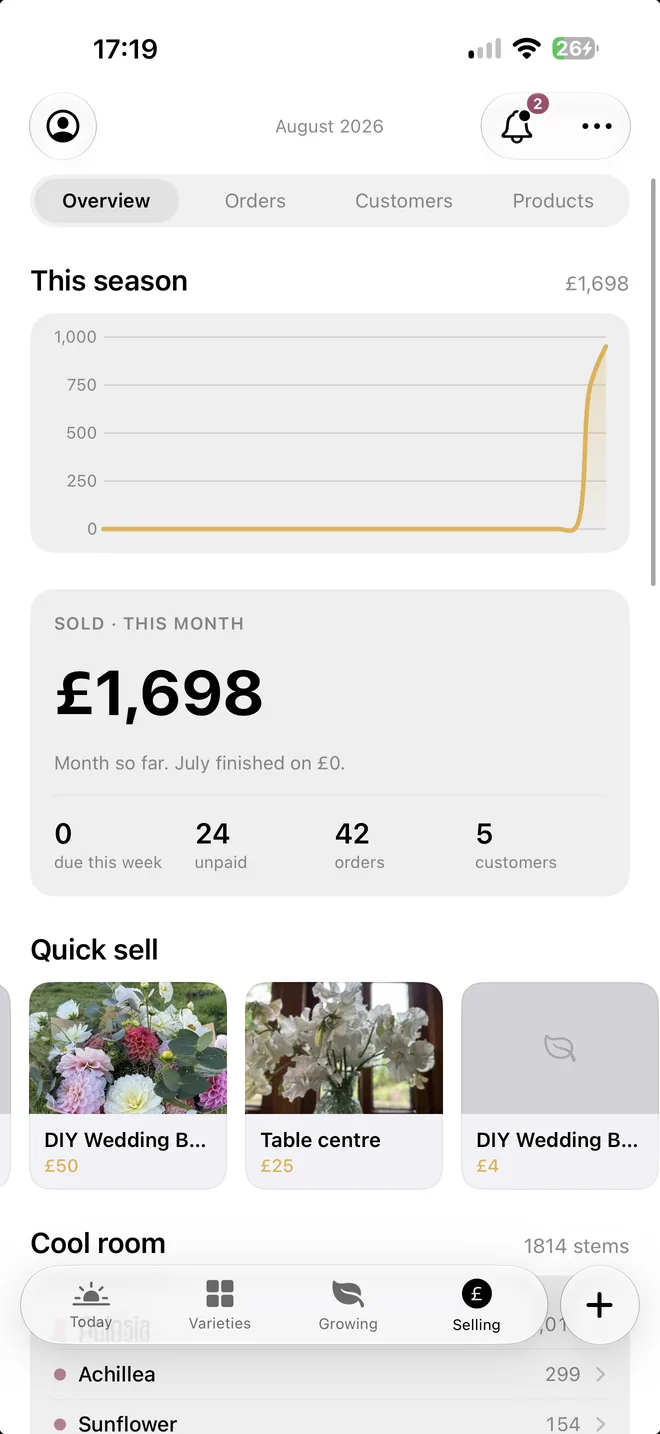
Today, at a glance.

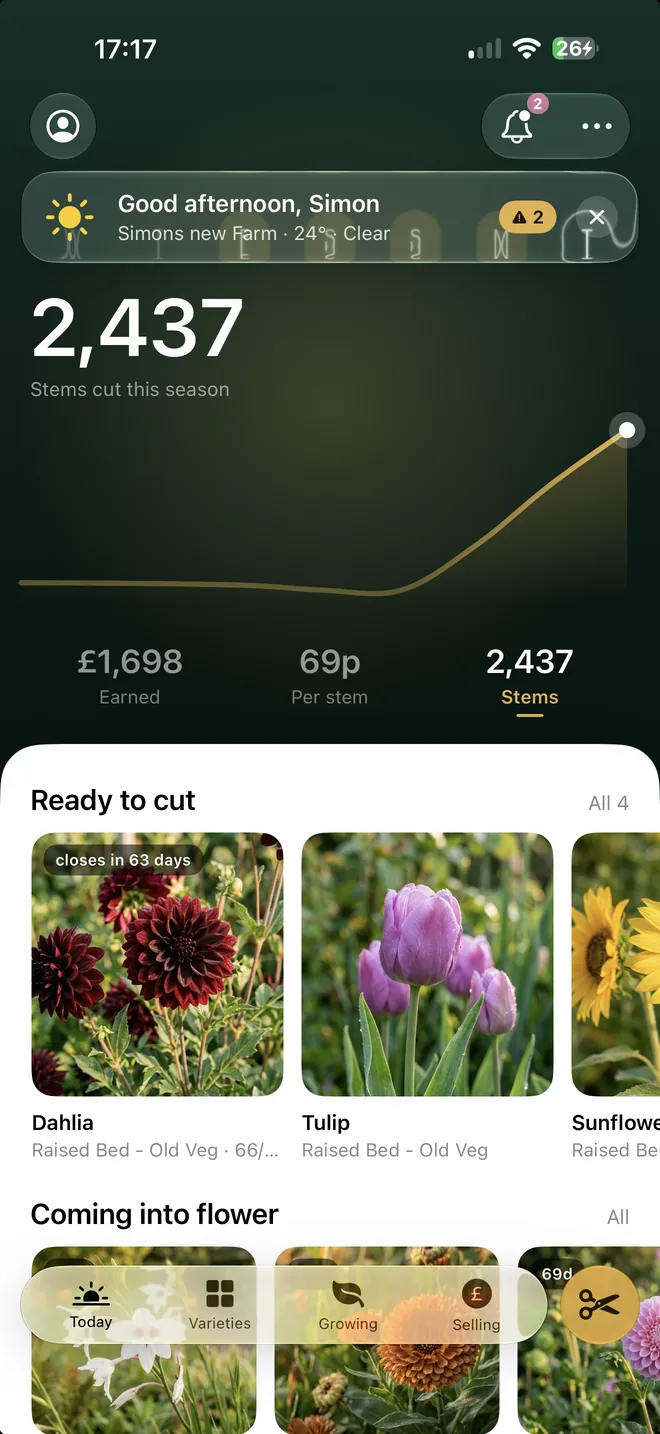
Open BloomOS and the day is waiting: stems cut this season and what they earned, what's ready to cut, and what's coming into flower next.

  • Ready-to-cut cards for every bed
  • Takings so far this season
  • What's next, before you need it
The BloomOS Today screen on iPhone: stems cut this season, what they earned, and what is ready to cut

Varieties

3,000+ varieties, properly known.

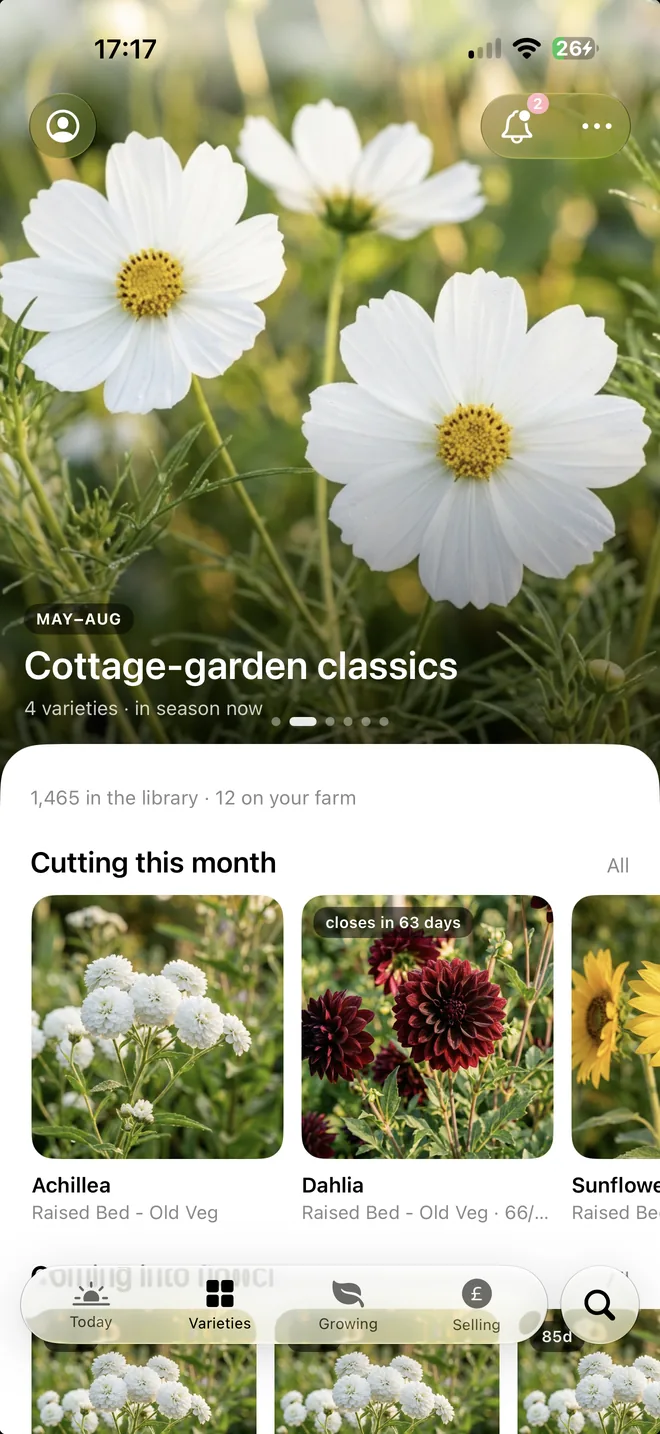
Every variety comes with its growing data: stem length, vase life, when it flowers, the stage to cut, and notes on sowing, pinching and feeding. See what's cutting this month across your own farm.

BloomOS Varieties: what is cutting this month, from a library of 3,000+ varieties

Plantings

Every planting, in its bed.

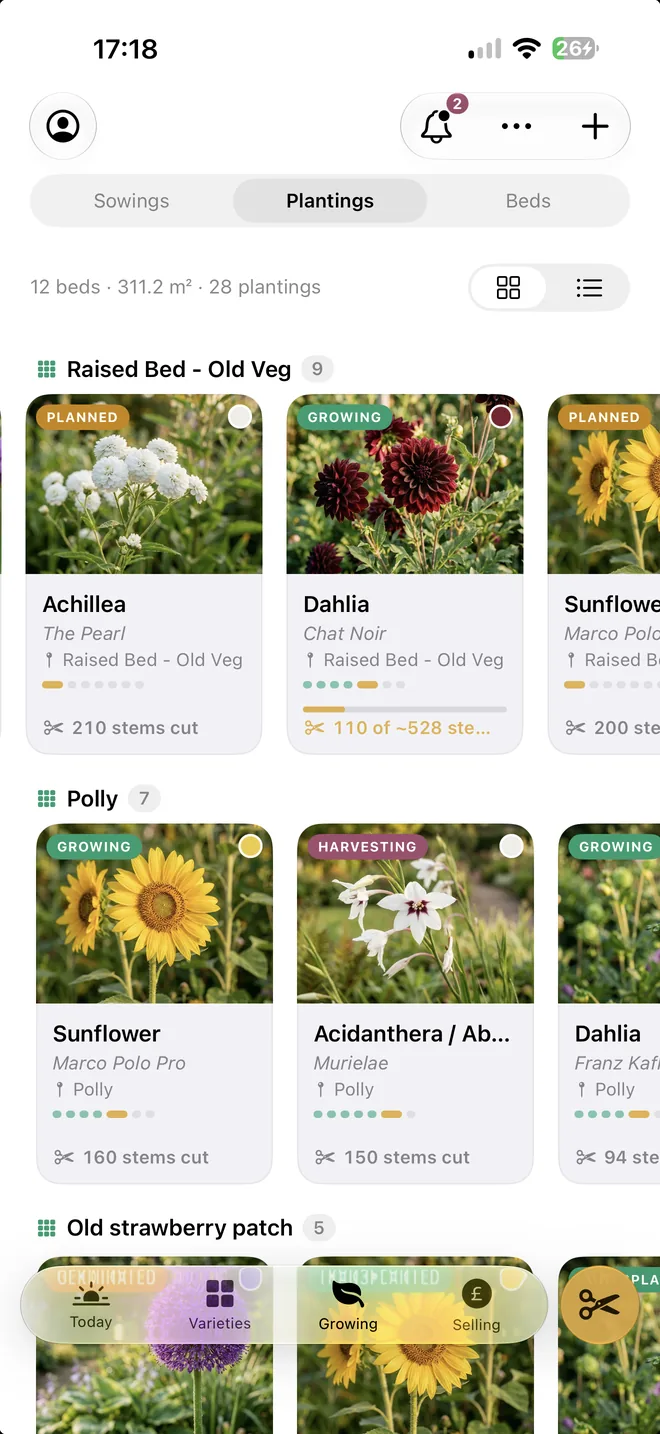
Record what went in, where and when, from sowing to germination to planting out. Your beds and plantings build the season calendar and the farm map for you.

  • Sowings, transplants and germination
  • Beds and fields, drawn once
  • A season calendar that fills itself
Plantings in BloomOS on iPhone: what went in, where and when

Weather

Frost alerts before the frost.

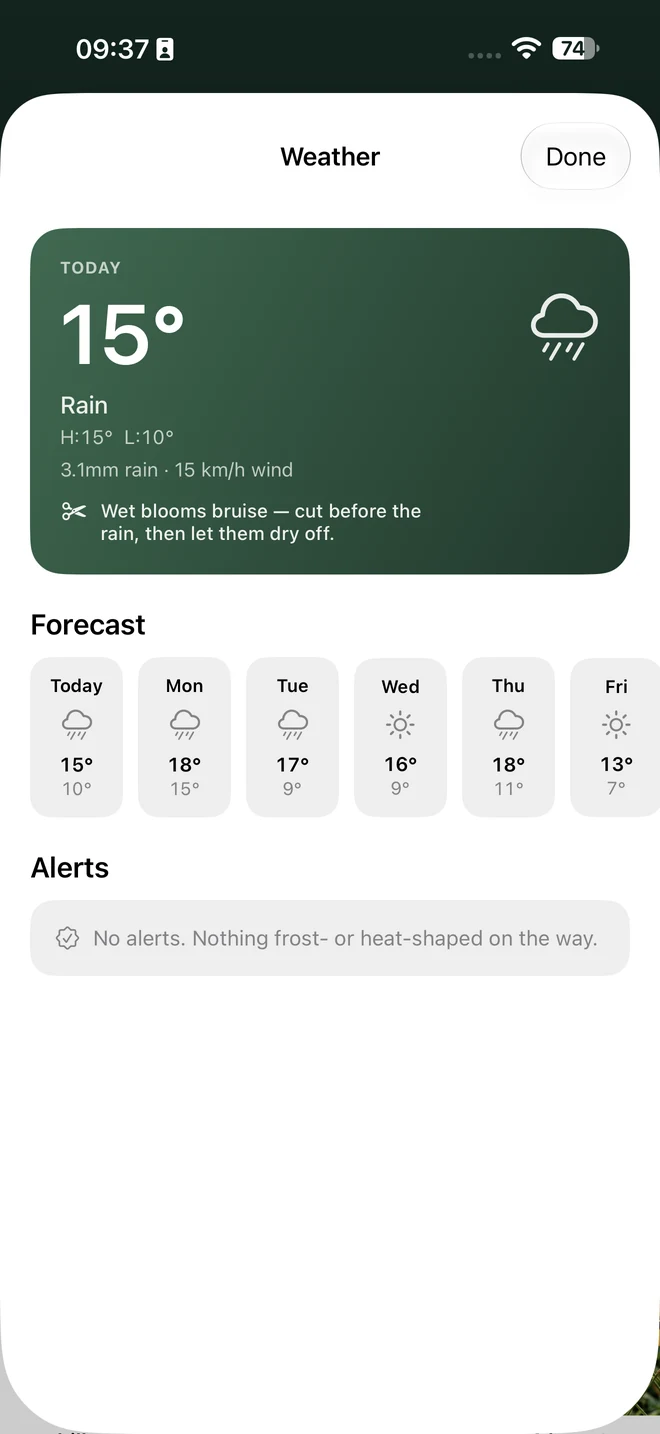
BloomOS checks the forecast for your farm every morning and warns you before a frost, a hard frost, a heatwave or heavy rain, with what to do about it. You set the temperature that counts as a frost on your farm.

Weather in BloomOS: today, the week's forecast, and frost or heat alerts for your beds

Selling

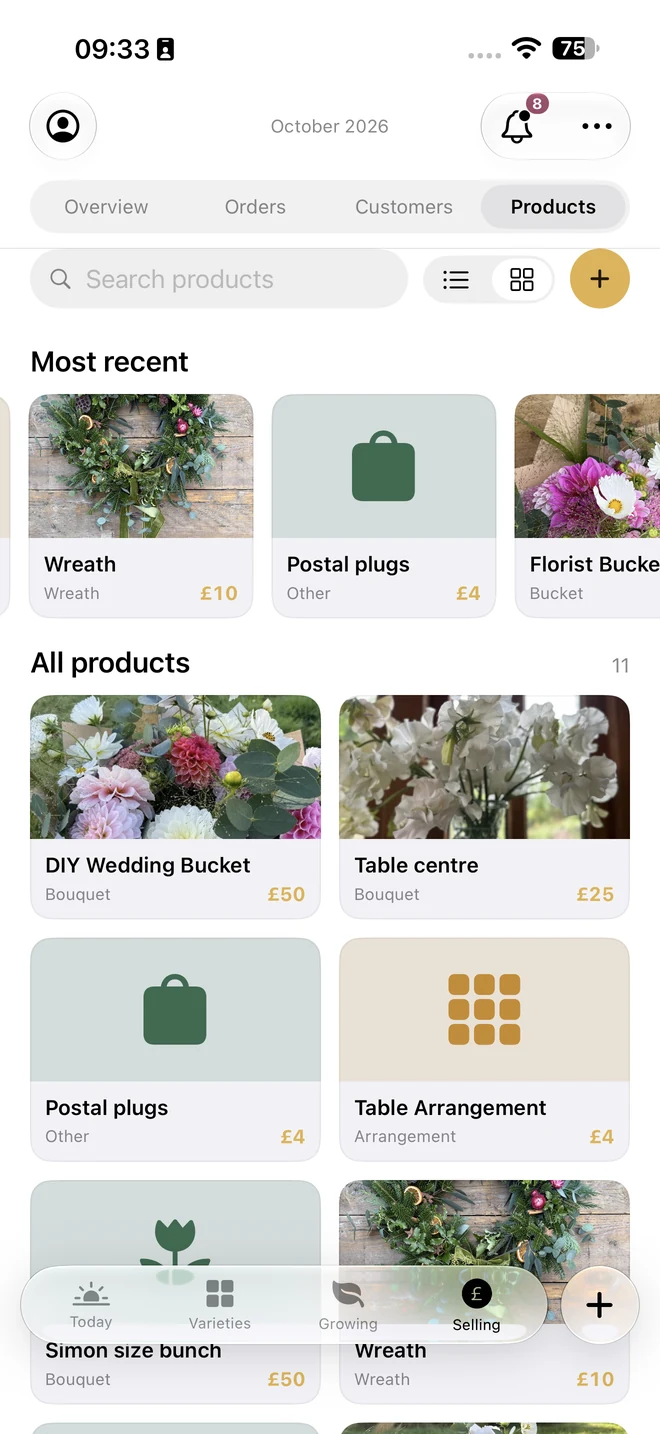
Your products, ready to sell.

Bouquets, buckets, wedding work and table centres, each built as a recipe of stems, so every product knows what it costs you and what it sells for.

Selling in BloomOS: your products, from wedding buckets to table centres, ready to put on an order

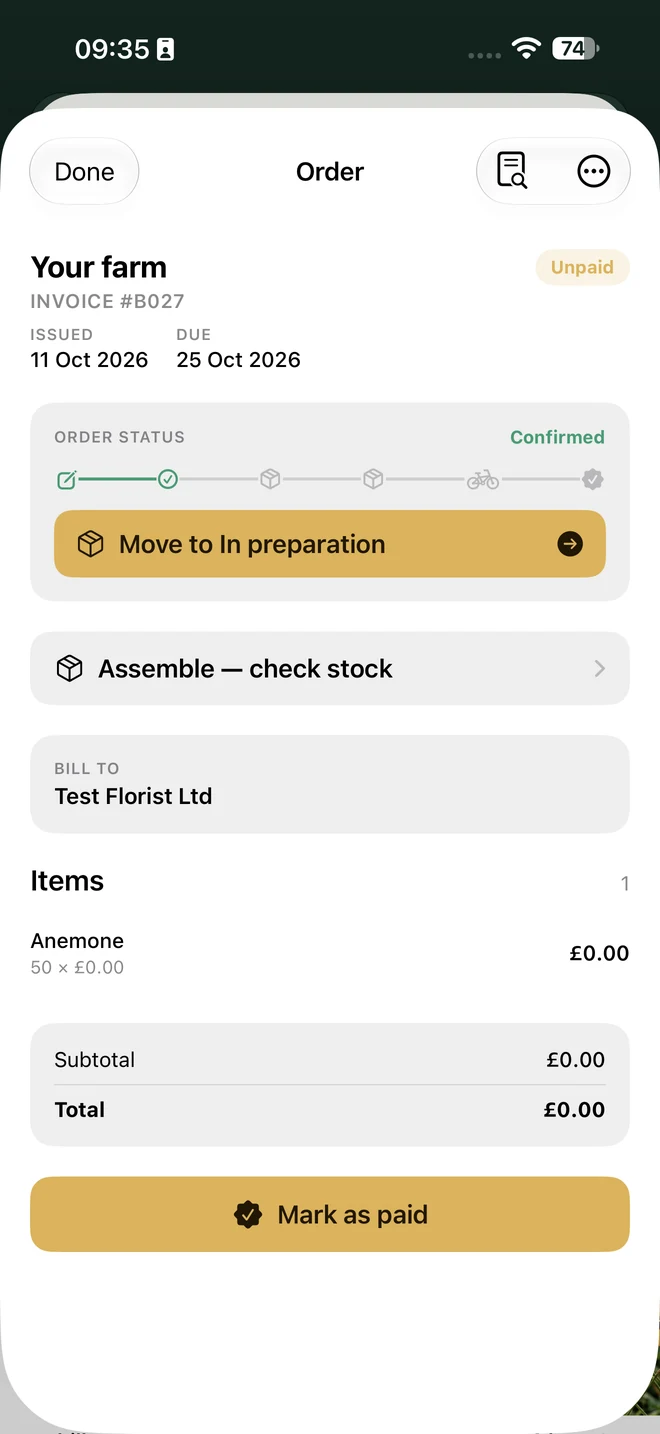
Invoices

Orders become invoices in a tap.

Take an order, check it against what's in stock, and turn it into a PDF invoice when it's ready. Mark it paid when the money lands. Invoices sync to Xero on the Farm plan.

An order read as an invoice in BloomOS: status, items and one tap to mark it paid

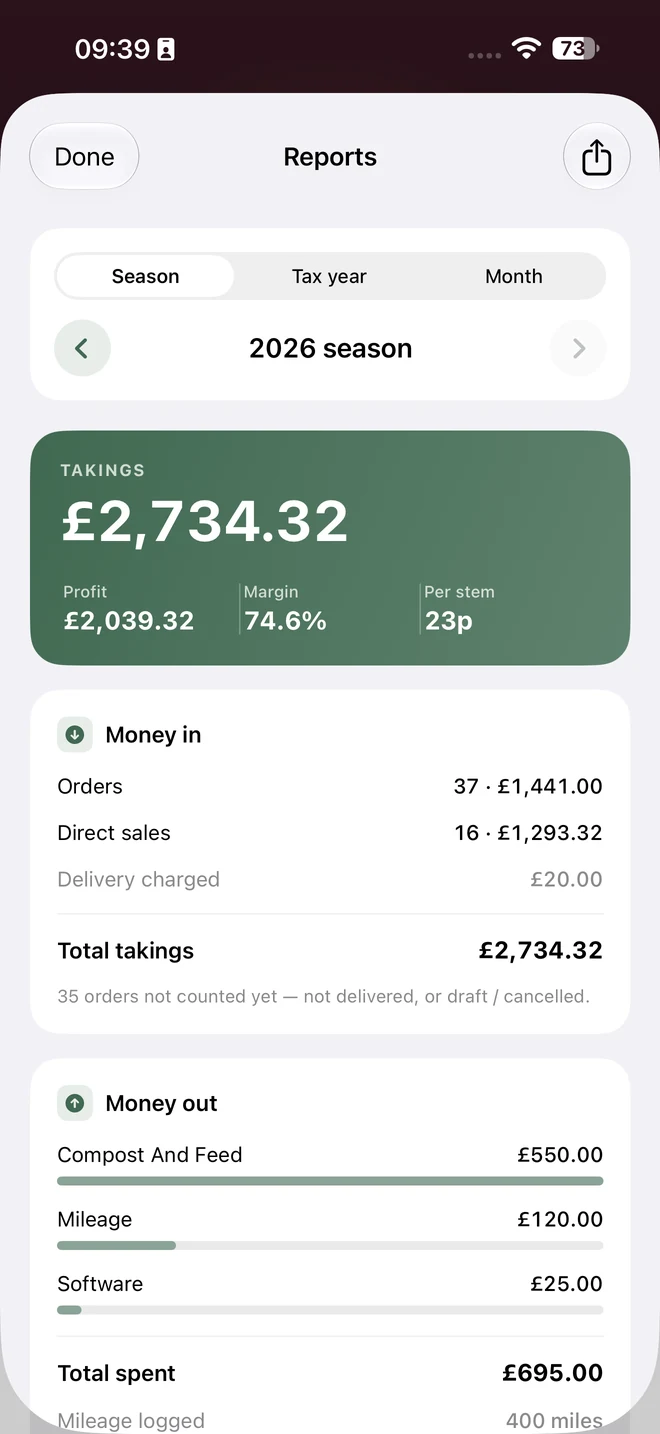
Reports

See what really pays.

Takings against expenses as the season goes, revenue per bed, price per stem and the best sellers by month. Next season's plan starts from what really sold.

Reports in BloomOS: the season's takings, profit, margin and price per stem

Subscriptions

Bouquet subscriptions that run themselves.

Add a subscriber once: weekly, fortnightly or monthly, the delivery day, the stems and the price. Each delivery turns into an order on its own, ready to cut to, pack and invoice.

  • No one forgotten on a busy Friday
  • Every delivery on the calendar ahead of time
  • Delivery notes and a packing list for the van
Selling in BloomOS on iPhone: this season's takings against expenses

One record

From the stem in your hand to your accounts.

Every cut you log carries on through the farm: into stock, onto an order, into an invoice, and on to Xero.

From the stem in your hand to the money in your accounts

Notebook and spreadsheet

  1. Log a cut
  2. Stock
  3. Order
  4. Invoice
  5. Xero

Written in the field, typed up later, invoiced from another file, retyped into the accounts.

BloomOS

  1. Log a cut
  2. Stock
  3. Order
  4. Invoice
  5. Xero

One record: the cut becomes stock, the stock fills the order, the order becomes the invoice, and the invoice goes to Xero.

Made for iPhone

Coming in the native app.

The native iPhone app is being built now with Apple's latest tools, alongside a companion app for Apple Watch. Here's what it adds when it reaches the App Store.

  • "Hey Siri, log a cut"

    Log stems by voice with your hands full, and start an order the same way.

  • Apple Watch

    A companion app for logging a cut at the bed, without reaching for your phone.

  • Widgets

    Today's stems and what's ready to cut, right on your home screen.

  • Control Centre

    A log-a-cut button one swipe away, from anywhere on the phone.

  • Your farm in 3D

    The farm map, drawn natively: every bed, field and polytunnel to hand.

  • Apple's latest design

    Built for the newest iOS, with Apple's Liquid Glass design throughout.

More screens

Planning, selling and goals.

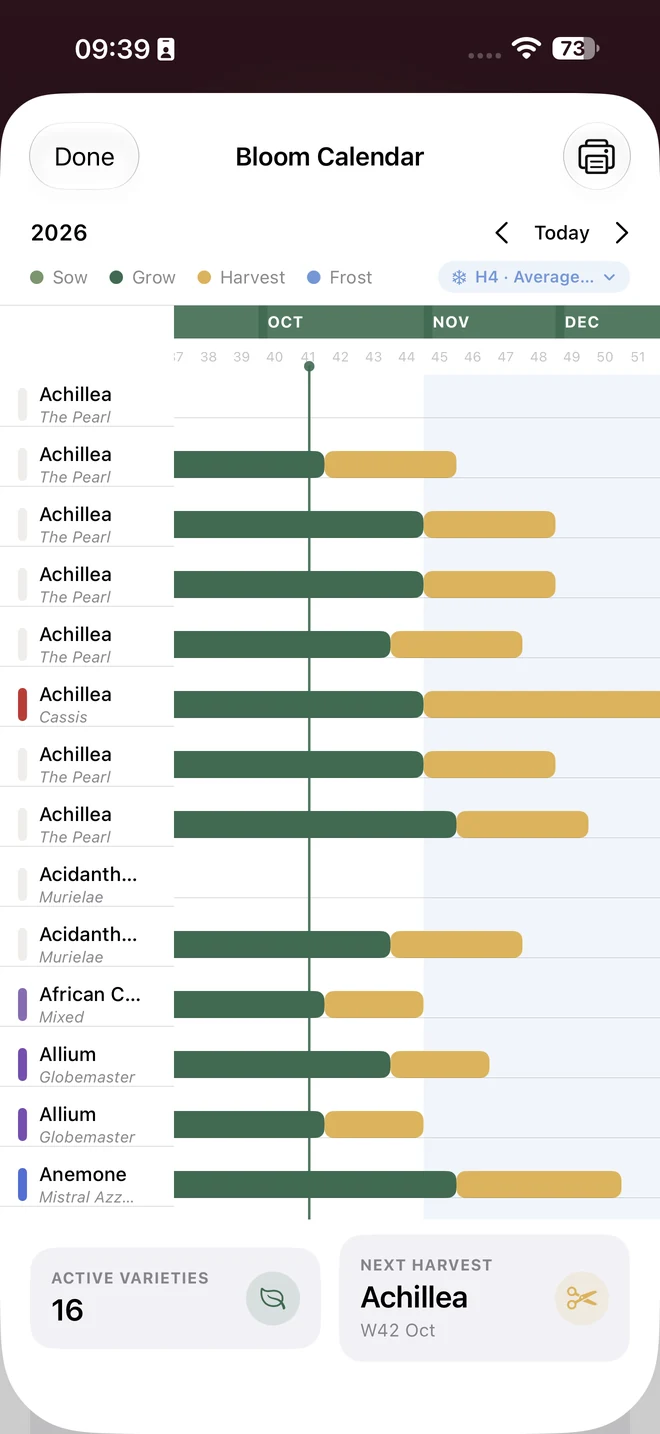
  • The Bloom Calendar in BloomOS: every planting across the season as a Gantt, grow and harvest windows, frost weeks shaded

    The Bloom Calendar: every planting across the season.

  • Selling in BloomOS on iPhone: this season's takings against expenses

    This season's takings against expenses.

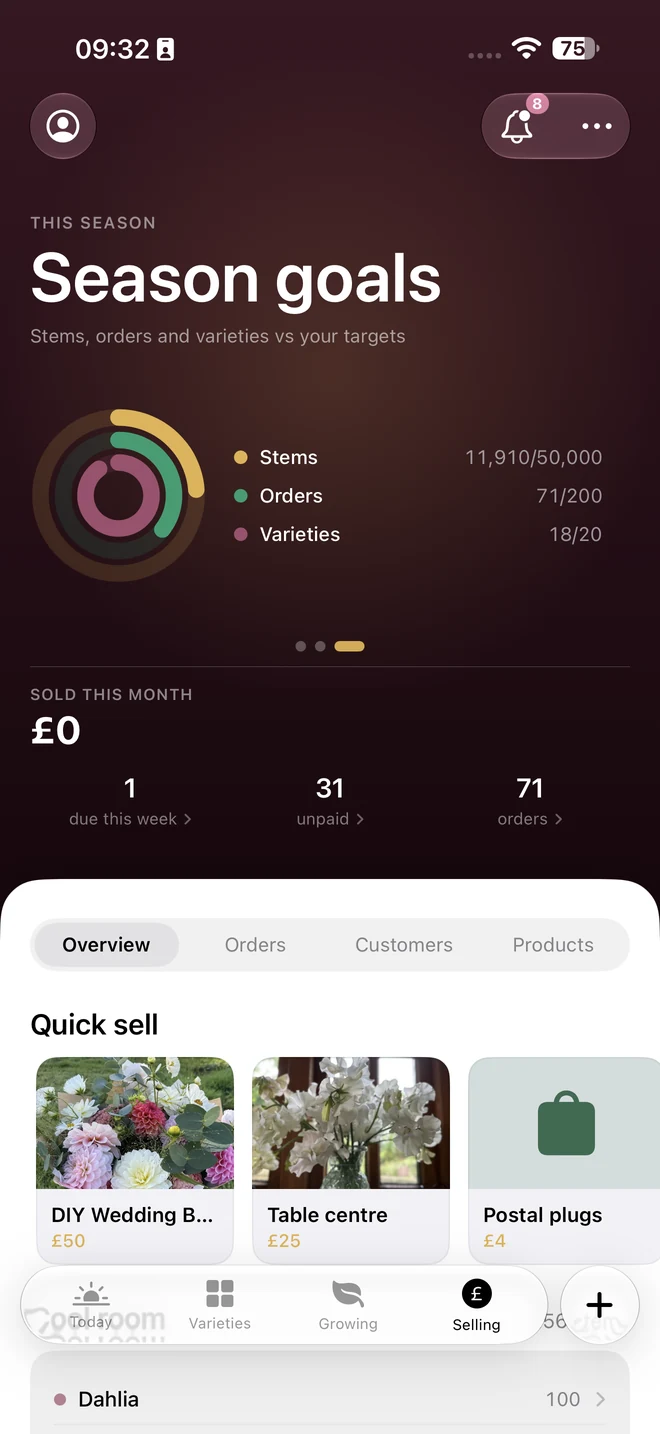
  • Season goals in BloomOS on iPhone: stems and takings against what you aimed for

    Stems and takings against your season goals.

Use it today

Getting the most from BloomOS on your phone.

You don't have to wait for the App Store. These work on any phone right now.

  1. Tip 01

    Add it to your home screen

    Open BloomOS in your phone's browser, tap Share, then Add to Home Screen. It opens full screen like an app.

  2. Tip 02

    Log at the bed, not later

    The keypad is built for wet gloves. Logging where you cut is the habit that makes every report true.

  3. Tip 03

    Don't wait for signal

    Cuts save on the phone straight away and sync on their own when you're back in range.

  4. Tip 04

    Give helpers a PIN

    Guest PINs let a helper log cuts without an account of their own. You see every cut they log.

  5. Tip 05

    Set your own frost line

    In farm settings, choose the temperature that counts as a frost on your ground, so alerts fit your farm.

  6. Tip 06

    Check Today each morning

    What's ready to cut and what's coming next, before you head out with the buckets.

Questions

About BloomOS on iPhone.

When is the BloomOS iPhone app coming out?

It's in development now and coming to the App Store. Join the list and we'll tell you the day it's ready.

Can I use BloomOS on my phone now?

Yes. BloomOS runs in the browser on any phone, iPhone or Android, and can be added to your home screen like an app. Your farm carries straight over to the iPhone app when it arrives.

Can I run flower subscriptions from my phone?

Yes. Add a subscriber once, choose weekly, fortnightly or monthly, the delivery day, the stems and the price, and each delivery turns into an order on its own.

Does it work without signal?

Yes. Logging a cut, and the rest of your farm on the phone, keeps working with no signal and syncs when you're back in range.

Will there be an Android app?

BloomOS works on Android phones in the browser today. The native app is for iPhone first.

Will the iPhone app cost extra?

No. It's the same BloomOS and the same plan, including the free Seedling plan.

Will there be an Apple Watch app?

Yes, a companion app for logging a cut at the bed is being built alongside the iPhone app.
Be first to know.

Join the list and we'll tell you the day BloomOS lands on the App Store. Or start on your phone today, free.

Join the list